

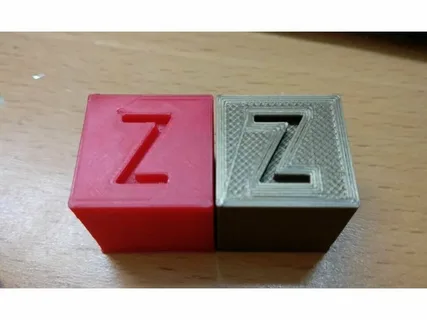
Ultimate Guide to Ironing Settings 3D Print for High-Quality Models
Ironing is a post-processing feature in FDM 3D printing that improves the top surface finish of a model by re-tracing the uppermost layer with a hot nozzle. Instead of extruding large amounts of filament, the printer lightly runs over the surface, smoothing out ridges and gaps between lines. This technique is especially useful for parts where the top surface is visible and aesthetics matter.
The ironing settings 3D print feature is commonly found in slicers like Cura, PrusaSlicer, and Creality Slicer. When enabled, it adjusts how the final layer is treated, often producing a glossy, almost injection-mold-like finish. While it does not affect structural strength, it significantly enhances visual quality, making it ideal for display models, prototypes, and decorative prints.
Benefits of Using Ironing Settings in 3D Printing
One of the biggest advantages of ironing is the dramatic improvement in surface smoothness. Standard layer lines on top surfaces can look rough or inconsistent, but ironing reduces these imperfections by redistributing melted filament evenly across the surface. This results in a cleaner, more professional-looking finish without additional manual post-processing.
Another key benefit of ironing settings 3D print is improved part consistency for aesthetic models. Designers and engineers who present prototypes often rely on ironing to make prints look more refined during client presentations. It also helps reduce the need for sanding or chemical smoothing, saving both time and effort in finishing workflows.
Key Ironing Settings You Should Adjust
To get the best results, understanding the main ironing parameters is essential. The most important setting is ironing flow, which controls how much filament is extruded during the ironing pass. Lower flow rates usually produce smoother finishes, while higher flow can help fill minor gaps more aggressively.
Another critical setting in ironing settings 3D print is ironing speed. Slower speeds generally improve surface quality because the nozzle has more time to evenly distribute heat and filament. Additionally, ironing spacing determines how closely the nozzle travels across the surface. A smaller spacing results in a more uniform finish but increases print time.
How to Optimize Ironing for Different Materials
Different filament types require different ironing adjustments to achieve optimal results. For PLA, ironing works exceptionally well because of its low melting temperature and stable flow characteristics. A moderate flow and slow ironing speed usually produce a glossy, smooth surface.
When working with PETG or ABS, ironing settings 3D print must be tuned more carefully. PETG can become overly sticky, so slightly higher speeds and reduced flow help avoid unwanted buildup. ABS, on the other hand, benefits from controlled temperature settings to prevent warping while still achieving a clean top layer finish.
Common Mistakes and Troubleshooting Ironing Issues
One common mistake is using excessive ironing flow, which can lead to blobs or uneven surfaces instead of smooth finishes. Many beginners assume more filament equals better smoothing, but in reality, too much material disrupts the surface consistency. Adjusting flow gradually is the best approach.
Another issue in ironing settings 3D print is overheating the top layer, which can cause smearing or deformation. This often happens when print temperature is too high or speed is too slow. To fix this, reduce nozzle temperature slightly and increase ironing speed until a balanced finish is achieved.
Conclusion
Mastering ironing settings can significantly elevate the quality of your 3D printed models, especially when surface appearance matters. While it may take some experimentation, the results are worth the effort, offering smoother, more professional-looking tops without additional post-processing.
By carefully adjusting ironing settings 3D print such as flow, speed, and spacing, and tailoring them to different materials, you can consistently achieve high-quality results. Whether you’re printing prototypes, artistic models, or functional parts, ironing is a powerful tool that helps bridge the gap between basic prints and premium-quality finishes.
